Optimizing Interactive Video: The Latency Challenge

At Ludeo, our engineering team focuses on converting live game sessions into instantly playable web experiences. When a user interacts with a shared gameplay clip, they can take control immediately within their browser, requiring no downloads, installs, or configuration delays. To deliver on this experience, the incoming video stream must achieve the real-time responsiveness of a local game rather than the relaxed cadence of a traditional television broadcast.
When a user initiates a session, any perceptible delay between a physical mouse movement and the corresponding screen update breaks immersion. If a character actions feel disconnected due to latency, user retention drops sharply.
The delay between user input and the rendered response is the critical metric of game streaming pipelines. To optimize it, we must analyze the entire video pipeline to identify exactly where latency accumulates, examine why standard video-on-demand (VOD) architectures fail under real-time constraints, and isolate the architectural choices required to achieve immediate responsiveness.
The first map: every place a frame can wait
Where does a quarter of a second of latency come from? It is not a limitation of physical infrastructure; light travels across a continent via fiber optics in under 30 milliseconds. Nor is it a limitation of compute; dedicated hardware encoders compress a single frame in just a few milliseconds.
The real culprit is structural queuing.
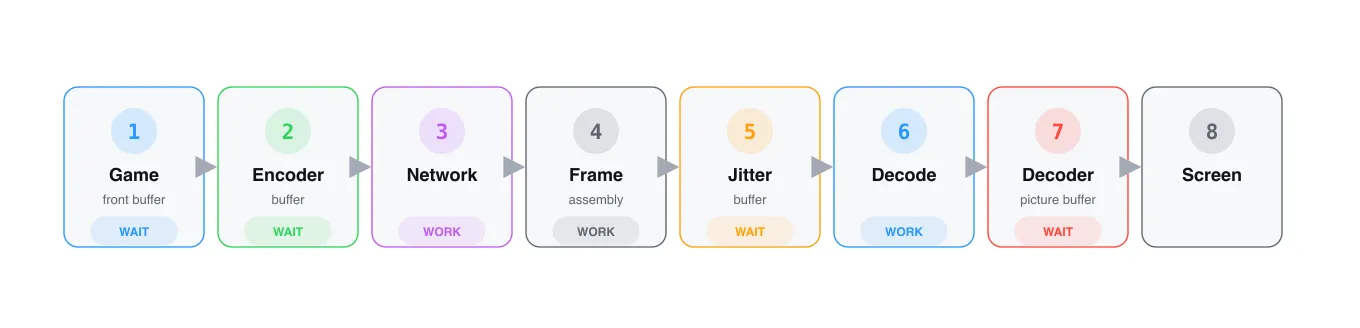
Every frame traverses seven distinct stages before reaching the display:
- Completed Frame: The game engine renders the image, and the finished frame is ready to leave the GPU.
- Encoder: The frame is compressed into a video bitstream.
- Network: The compressed frame is fragmented into packets and transmitted across the internet.
- Frame Assembly: The receiver collects these network packets and reconstructs the original compressed frame.
- Jitter Buffer: A temporary staging area that smooths out variations in network arrival times.
- Decoder: The compressed frame is decompressed back into raw pixel data.
- Decoder Picture Buffer (DPB): Decoded frames wait in sequence until their scheduled display time.
Out of these seven stages, only three involve active computation or transmission: encoding, network transport, and decoding. The remaining stages are passive queues. Latency in interactive streaming is largely defined by the time a frame spends waiting in line.
What a codec actually does
Raw video data is highly bandwidth-intensive. An uncompressed 1080p video stream at 60 frames per second (fps) requires roughly 3 Gbps of throughput, far exceeding standard residential internet connections. Video codecs solve this by compressing the data, primarily by encoding only the changes between frames rather than transmitting entirely independent images.
A few terms matter here. The encoder compresses video on the sender side. The decoder decompresses it on the receiver side. A buffer is not the encoder itself; it is a place where frames wait before the encoder, decoder, or display path can use them.
A codec typically utilizes three frame types:
- I-frames (Intra-coded / Keyframes): Completely self-contained images that can be decoded independently.
- P-frames (Predicted): Compressed frames that reference temporal changes from a preceding frame.
- B-frames (Bi-directional predicted): Highly compressed frames that achieve maximum efficiency by referencing both past and future frames.
While B-frames offer superior compression, they introduce a significant architectural bottleneck for real-time applications: lookahead delay. Because a B-frame relies on a future frame, the encoder must hold up processing until that future frame is generated. Consequently, the decoder must receive these frames out of chronological display order and reorder them before rendering, introducing mandatory buffering at both ends of the pipeline.
Why VOD pipeline can afford to wait
For traditional video-on-demand platforms like YouTube, playback latency is functionally irrelevant to the viewer experience. Whether a frame was generated 15 seconds or a minute prior to viewing does not impact consumption. As a result, these architectures optimize strictly for visual quality per bit.
An inspection of high-traffic 1080p H.264 and VP9 streams via ffprobe highlights this design paradigm:
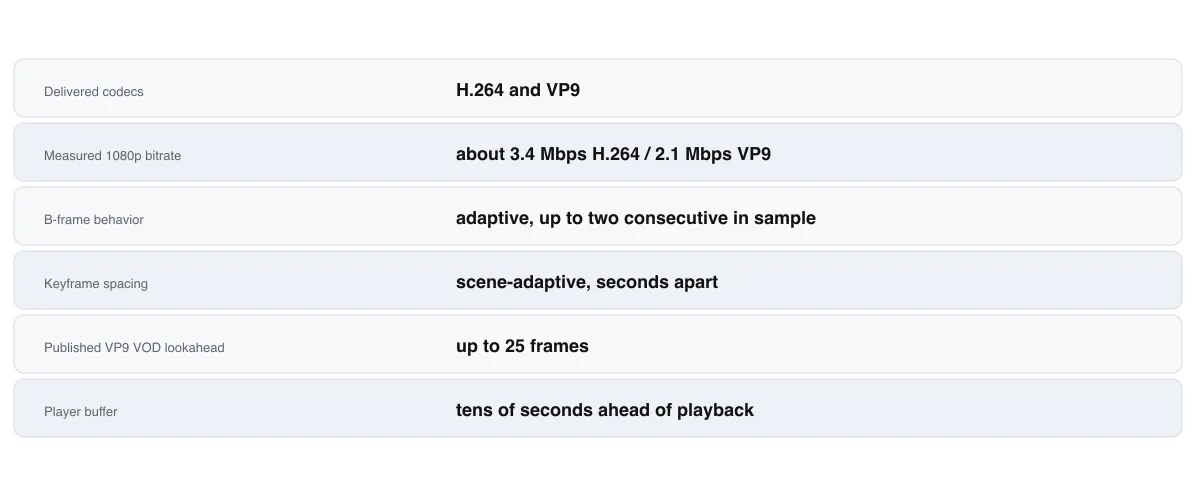
These configurations drastically reduce bandwidth requirements but introduce deep pipelines that are fundamentally incompatible with real-time interactivity.
Calculating the Latency Cost of a B-Frame Pipeline
To see the mathematical impact of B-frames on real-time streaming, let’s analyze an illustrative pipeline modeling a 1080p, 60 fps stream using a standard P-B-B-B-P frame structure. At 60 fps, a new frame is generated every 16.7 milliseconds. We will assume a standard network round-trip time (RTT) of 45 milliseconds.

- Encoding Delay: When P0 arrives, it can be encoded immediately. However, the subsequent frame B1 cannot be processed until P4 is generated four ticks later. The encoder must buffer P0, B1, B2, B3, and P4 before it can begin compressing the group. This introduces an immediate structural delay of approximately 83 ms. (Note: File-oriented production encoders like x264 often add an additional 40-frame lookahead for rate control, accumulating two-thirds of a second of latency before encoding even begins).
- Decoding and Reordering Delay: The same dependency tax applies at the receiver. To decode B1, the decoder requires P4 first. The frames travel in decode order (P0, P4, B1, B2, B3), and the Decoder Picture Buffer must hold and re-sort them back into display order. This introduces a 4-frame reordering delay, adding 67 ms.
- Cumulative Pipeline Total: When combining these structural factors with standard operational overhead, the latency budget itemizes as follows:
- Game Front Buffer: 17 ms
- Encoder Lookahead Buffer: 83 ms
- Network Transport (Half RTT): 22.5 ms
- Jitter Buffer: 41 ms
- Decoder & DPB Reordering: 67 ms
- Decode Compute Time: 15 ms
Total Glass-to-Glass Latency: ~246 ms
Of this total, 150 milliseconds are entirely dedicated to B-frame arithmetic. This delay cannot be mitigated by faster hardware; it is a structural consequence of waiting for future data.
Eliminating the B-Frame Bottleneck
By removing B-frames from the configuration, the dependency chain simplifies significantly. Every frame now references only past states.
Consequently:
- The encoder compresses each frame the moment the game engine produces it (reducing encoding delay to 17 ms).
- Decode order matches display order, entirely eliminating the reordering stage from the Decoder Picture Buffer (0 ms delay).
The trade-off for removing B-frames is an increase in the required bitrate to maintain identical visual fidelity. For static playback, this is inefficient; for interactive streaming, it removes 150 ms of latent overhead instantly.
Streamlining the Client: WebRTC Integration
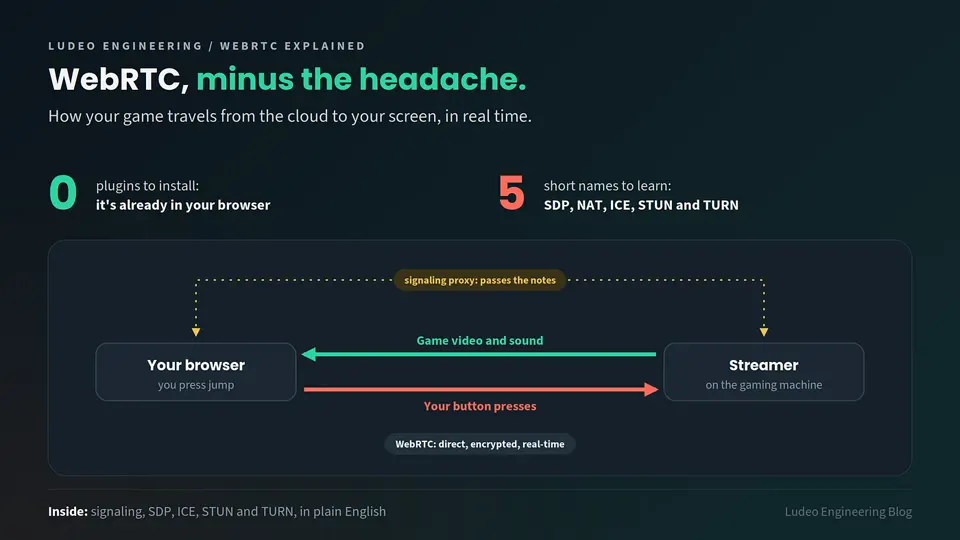
WebRTC the open-source, real-time media engine native to modern browsers defaults to this exact paradigm. It natively restricts streams to I-frames and P-frames to achieve low-latency communication.
With WebRTC, every arriving frame can be decoded on arrival because its historical reference frames are already present.
In a standard WebRTC implementation, only one significant queue remains: the jitter buffer. Because public networks deliver packets unevenly, the jitter buffer acts as a shock absorber, holding frames briefly (around 41 ms in our model) to ensure smooth playback and allow time to retransmit dropped packets. This brings the total glass-to-glass latency down to approximately 113 ms.
Optimizing for Immediate Video
While a 41 ms jitter buffer is ideal for maintaining smooth video playback during a one-way call, it represents an unnecessary layer of padding for an interactive application operating on a stable network connection.
To eliminate this, we leverage the browser’s playout delay extension. By passing a hint to the browser’s media engine setting both the minimum and maximum playout delay to zero, we disable the network smoothing buffer entirely. The browser is forced to pass every frame directly to the decoder the microsecond it is assembled.
This reduces the active pipeline down to four core processing stages: Capture →→ Encode →→ Network →→ Decode, dropping glass-to-glass latency to roughly 72 milliseconds.
Architectural Comparison: 246 ms down to 72 ms
By systematically stripping out non-processing queues, the performance improvements itemize cleanly:
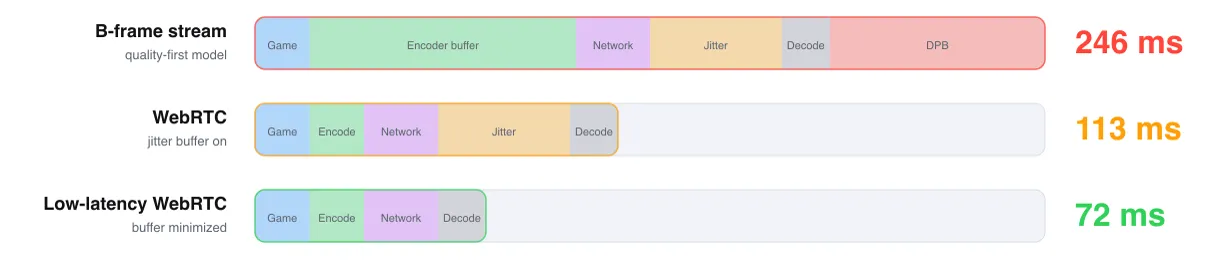
At 72 milliseconds, the pipeline contains no legacy queues; the frame is either being actively processed or is in transit.
Why WebRTC is the Right Architecture
Rather than engineering a proprietary transport protocol from scratch, we chose WebRTC due to its structural integration within the modern web stack.
WebRTC operates entirely outside the single-threaded JavaScript environment. Packet assembly, jitter tracking, and hardware-accelerated decoding occur natively within the browser’s underlying media engine. Decoded frames are handed directly to the browser’s browser compositor.
This means that even if a web application suffers a heavy JavaScript garbage-collection pause or main-thread stall, the underlying video frames continue to render at native display frequencies without hitching.
The Latency Hierarchy
To understand where this leaves us, we can map current streaming technologies across a structural latency spectrum:
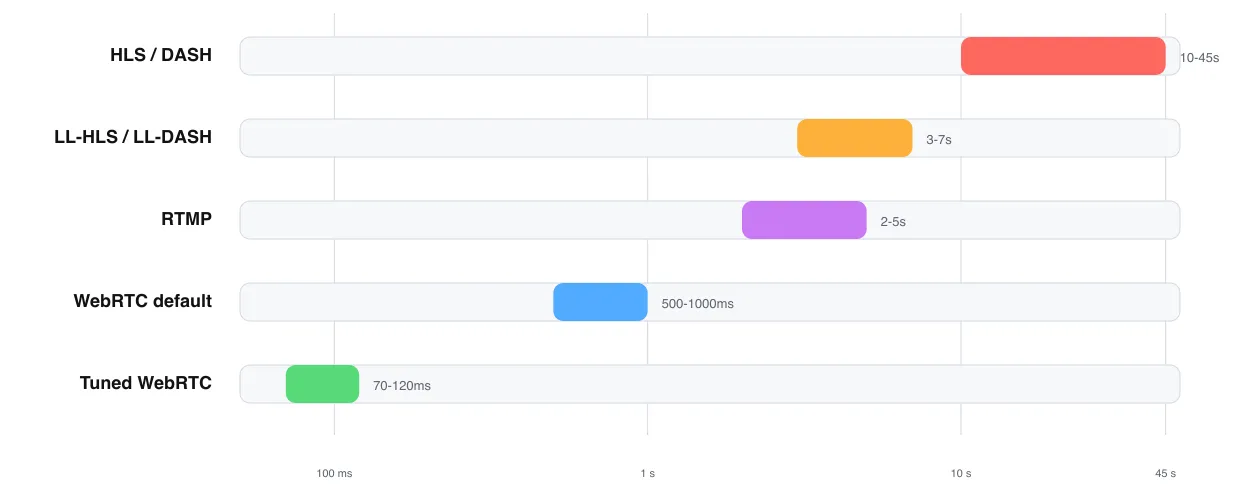
Each step down the ladder exchanges caching simplicity and massive viewer concurrency for raw immediacy. Interactive gaming applications must operate on the lowest tier to remain viable.
The Bitrate Misconception
A common anti-pattern when attempting to resolve streaming latency is to lower the stream resolution or bitrate (e.g., dropping from 1080p to 720p).
While lowering bitrates minimizes network serialization times on heavily congested connections, it does not alter structural latency. The 5-frame encoder lookahead costs 83 ms, the reorder buffer costs 67 ms, and the jitter buffer holds frames based on time, regardless of whether those frames contain 1 megabit or 10 megabits of data. Lowering the bitrate without modifying the underlying pipeline architecture results in a degraded visual experience while leaving the latency profile completely unchanged.
Next Steps: Managing an Unbuffered Pipeline
By stripping out the lookahead windows, reordering mechanisms, and jitter buffers, we have established a highly optimized 72 ms video pipeline. However, removing these structural shock absorbers introduces a new engineering challenge.
Without a jitter buffer, a single dropped network packet or a momentary Wi-Fi degradation will instantly impact the client player, risking a frozen frame or a broken P-frame dependency chain.
In our next engineering brief, we will detail our mitigation strategies for unbuffered streams: implementing error correction layers that resolve packet loss in single-digit milliseconds, executing real-time frame recovery techniques, and optimizing keyframe request strategies to preserve low-latency playback under real-world network conditions.